Tip Of The Week

Showing posts with label How To Video. Show all posts

Sunday, July 17, 2016

Google Forms To Rock Your World!


bit.ly/Formsthatrock
How To Get Started With Google Forms
Google Forms is a great way to collect and organize digital assignments, links, or other data.


Start With This Form


Copy the Results
________________________________________________________________

Forms For Writing

Use Autocrat to Create Personalized Docs From Form Responses Or send out Certificates as uneditible PDF's 

________________________________________________________________

Challenge
Uploading To My maps
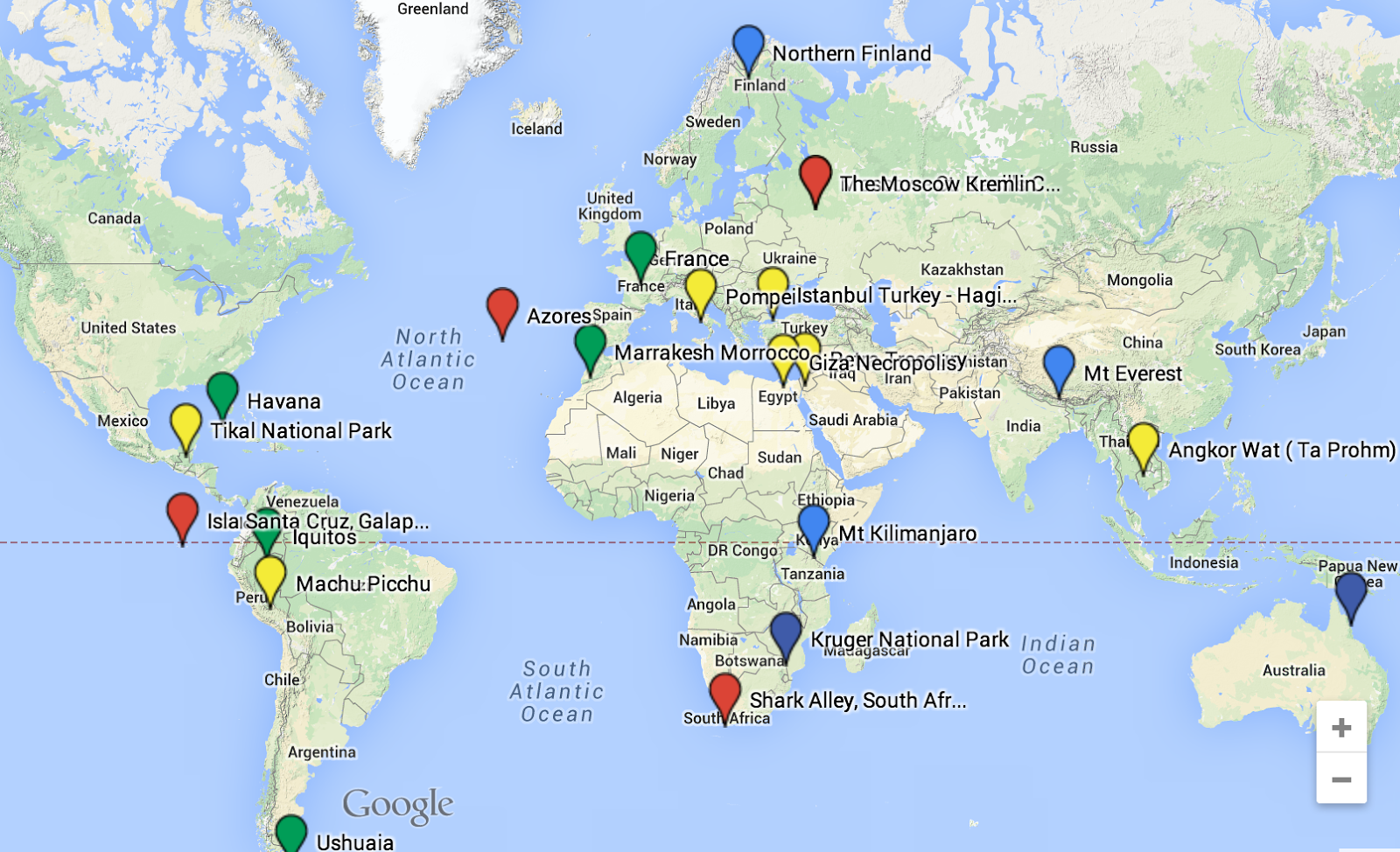
Where would you go tomorrow if I gave you $10,000,000,000 Today?


Create a Form
With 2 multiple choice, checkbox, or scale questions to help you screen your guests.

Example
Will you go surfing with me?
On a scale of 1-10 how well do you cook?


Then complete this form to enter the $10,000,000,000 contest

The Map
View Locations Here
Location Results
________________________________________________________________

Other Awesome Add-Ons
Form Mule - Automate E-mail Responses
Form Ranger - Workshop Signups
Eliminator - Eliminate choices once selected
Flubaroo - Auto Score Responses
Doctopus - Push Docs out to students
Goobric - Interactive Rubric.
Site Maestro - Push out student websites

Presentation Feedback


Monday, September 28, 2015

A Day At The UN - With Google Hangout's On Air

Google Hangouts On Air is a great way to bring real world experts into your classroom. On 9/15 students at Foothill High School were able to have a conversation about the Syrain Refugee crisis with Melissa Fleming, a spokesperson for the United Nations High Commision For Refugees. Google Hangouts is a video conferencing tool built into Gmail and Google+. The "On Air" feature (Only in Google+) allows the video call to be broadcast to any audience in another classroom or around the world. At the conclusion of an On Air Hangout, a video will be created and sent to the creators YouTube Channel. That may be shared On Demand. 

How To Create and Brodcast a Google Hangout On-Air
Video


How To - Slide Deck

Tuesday, August 25, 2015

Get started with Digital Portfolios For Middle School Students

 Example
The digital portfolio template that has been created is designed to work across content areas and levels. It is set up as an announcement page to allow students to post their work they wish to publish mimicking a blog post. The most current posts will be at the top and the most recent post for each subject will be showcased on the students homepage. 

Teachers should collect a direct link to the students content area page, not the home page. For example Science Teachers will collect a link to the Science Tab. 

You can collect these links using Google Classroom or Google Forms.

Link For Students To Create Their Portfolio From Template


A How To Tutorial Video


Saturday, August 1, 2015

California's Drought - There's A Map For That


How To Videos

__________________________________________________________________

bit.ly/droughtmap
Click on the Image to Make a Copy
 Make A Copy Of Drought Hyper-Doc


Google Maps - Great for viewing, directions, weather patterns, Moon phases, and Measurements. Does Not Save!


Google My Maps - Most Google Maps tools, plus the ability to Collaborate, Share and Save. Add multiple Layers, images and videos to your map and places.

Google Tour Builder - Create an ordered tour with locations, text, images and videos.
__________________________________________________________________


__________________________________________________________________

It is now possible to use Chromeboooks to create tours. However, Tours will look and work better if created and played on a different web browser. Chrome OS does not allow 3-D tours. 


3D Tours (not available in Chrome)

__________________________________________________________________
More Maps Resources

Tuesday, June 16, 2015

There's a Map For That

There’s A Map For That


How often do you mention locations in class without showing students where that location actually is? The Internet has revolutionized the way that we get directions, and now maps can be easily integrated into any course, topic or project. Everything takes place somewhere, now you can show it on a map.


https://www.google.com/maps/d/edit?mid=zVXww_VL0Hyo.kx-kCCZmmvog


Saturday, October 25, 2014

Writing with Forms and Autocrat

Have you ever tried to use Google Forms to help support student writing? 

Forms are a great way to help students organize writing. You can create the outline or graphic organizer using a form. Students complete the form and answer questions like: What's your claim, what evidence are you using, explain your reasoning, write a short conclusion... Teachers can then run the Autocrat add on to turn the form responses into a personalized essay outline for students. As a teacher, it makes it easy to look at specific elements like reasoning by going through the reasoning column on the spreadsheet (as opposed to reading the entire piece). If you add comments in another column before you run autocrat students can have feedback added to their outline. 


Create a Form


View the columns on the spreadsheet that you want. 


Run Autocrat and create a student created personalized outline for each student

Thursday, October 2, 2014

Lit Trips/Google Earth Tours on Chromebooks


How to Convert a Google Earth Tour For Use On A Chromebook
I love my Samsung Chromebook! Sure, it does not have all the bells and whistles that my macbook does but it's light, durable, CHEAP and does almost everything I need it to do. However, I have always been frustrated that it is not possible to run Google Earth on the Chromebook. As a former geography teacher Google Earth gave my class access to the world. As Chromebooks continue to fill classrooms around the country it is important to know how you can convert tours and lit trips that have been created using Google Earth onto My Maps (formerly maps engine lite) which is accessible to Chromebooks. Google Lit Trips


Screen Shots from Google Earth


Screen Shots from MyMaps (maps engine)

Monday, September 15, 2014

Turn your films into EDpuzzle


                         Can You EDpuzzle?
If a picture is worth 1000 words, and a film has 24 pictures per second then 1 minute film should be the equivalent of 24,000 words, even if we round down. Though this metaphor may not be scientific, there should be no question about the power of film in class. Films provide a context for learning,  a record and a means of communication. Beyond that, they are a great tool to help build students curiosity. As a social studies teacher, allowing students to visually see primary or recreated images of people living during the depression provides a context to understand the time period. As a science teacher, it can provide a factual record of an experiment (as seen below). Teachers can use these films to communicate ideas and content to students. However classroom time is often to valuable to show lengthy films and students watching them at home lose the instructional benefit a teacher can add to a film. EDpuzzle, provides a platform for teachers to use film as instructional tool outside of the school day. It makes it possible to pause the video, insert audio comments and ask students questions. Send it out for homework and save the class time for something else! Can you EDpuzzle?

How to Get Started


A Science Example

Early Elections


Tuesday, September 9, 2014

5 Things Every Teacher Needs To Know About Google Forms
________________________________________

The Bottom Line - Forms will change your world! They can help you collect and organize data, assignments, or student information. These are five of the basic, but most useful features that I believe forms offers teachers. 

1) How To Collect Digital Projects Using Google Forms
Forms is a great way to collect any digital assignment. It makes it easy to organize and access web links.

2) How to share and send your Google Form
Do you know how to share your form so your students can access it?

3) Using summary of responses to share live feedback
The summary feature automatically makes visual representations of the data collected from your form. Use it to poll your students and display their responses.

4) How can students edit their responses in Forms
Did you assign a form in class and students did not have time to finish it? Learn how to easily access forms that have already been submitted and change your responses.
5) Compare forms and identify students that did not complete it.
Want to learn how to quickly identify who did not complete the form? It is a little bit geeky, but  its not too hard.

Getting Geeky With Forms
Want to use the data in your form to send E-mails, merge documents, or push items out to students? As you continue to explore Google Forms, check out some of the Add Ons which allows the user to run a script that will tell the form to do something. Former teacher and Administrator Andrew Stillman has created many scripts with New Visions Cloud Lab. Find out more about them here.


posts