Tip Of The Week

Tuesday, June 16, 2015

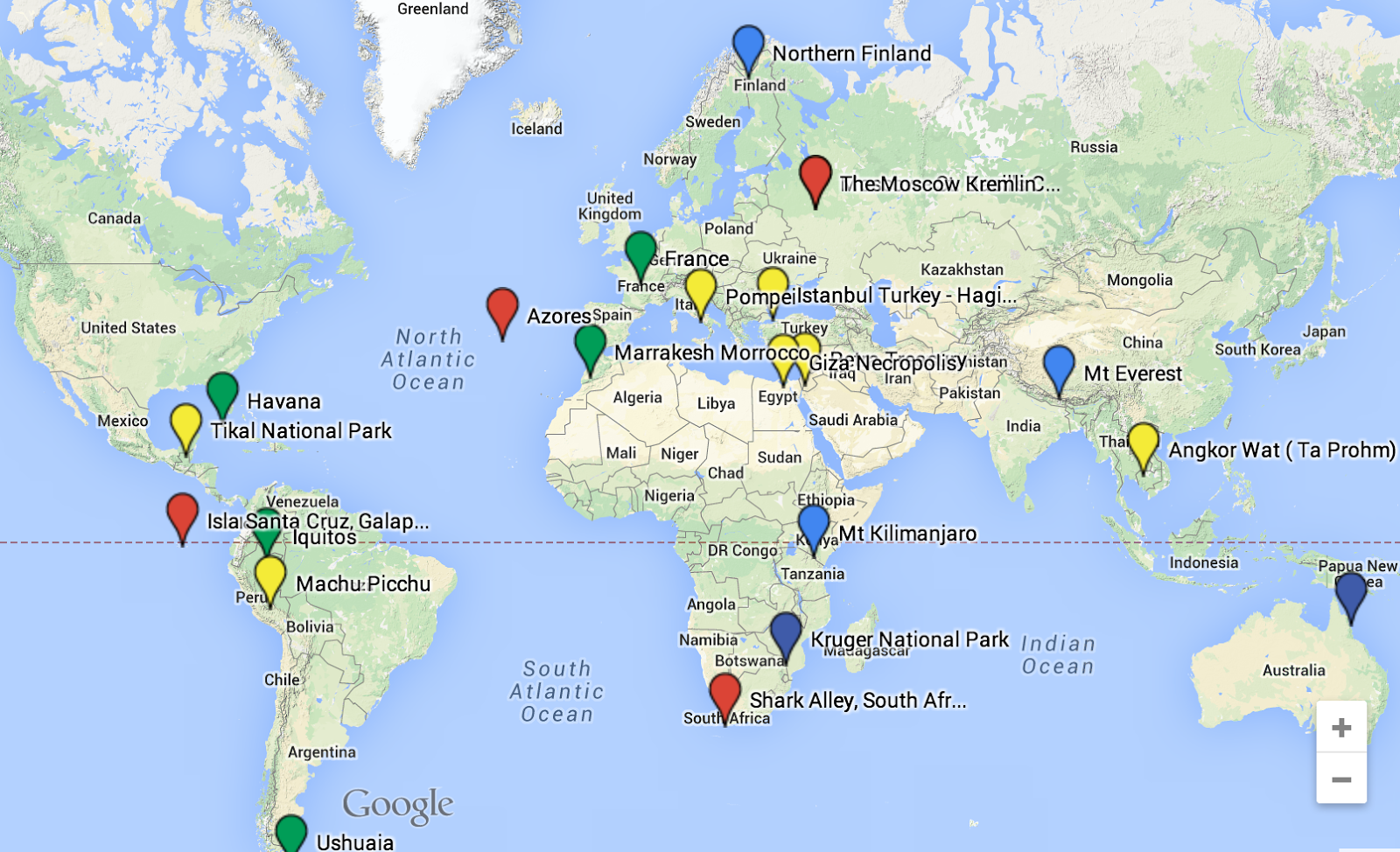
There's a Map For That

There’s A Map For That


How often do you mention locations in class without showing students where that location actually is? The Internet has revolutionized the way that we get directions, and now maps can be easily integrated into any course, topic or project. Everything takes place somewhere, now you can show it on a map.


https://www.google.com/maps/d/edit?mid=zVXww_VL0Hyo.kx-kCCZmmvog


Friday, June 5, 2015

Chrome Apps/Extensions to Improve Workflow and Make Your Life Better


Have you ever found yourself completing a task on your computer thinking 
"There has got to be a better way!"
Well...There Probably Is
This list of Chrome Extensions and Apps have made my life better and I hope they can help improve yours. If you know of something that is missing from this list, post it in the comments.

Extensions: Shortcuts that perform a function, located at the top right of your browser.
Application: Stored in your Apps, shortcuts for programs with more developed user interfaces.
Add-Ons: Scripts designed to complete some function in Google Docs, Sheets, Forms
All will help you bit.ly/Workbetter
Shortened URLS
Customize and shorten your URL - bit.ly/Workbetter
Screen Shot 2015-04-28 at 9.31.00 AM.png
Shorten URLs and create QR Codes to Scan
Tab Management
Open a window listing tabs when you have too many open
Create sets of tabs to open together
Images
Take Screenshots and Annotate on them

Edit Photos and Images
Makes Life Better
Remove Ads and junk on text
Block ads on web pages
Makes Life Even Better
Create Docs in one click!
Save an entire webpage as a PDF
Video’s

Screencasting Made Easy


Import Slides and create a video presentation
Text To Speech &
Speech To Text
Convert Text To Speech


This App opens a notepad that will transcribe your voice. The notes can be copied and pasted over on a google doc
Literacy Tools
Create a citation for a site
Annotate Text, annotations can be copied to a notepad
Literacy Tools

Annotate Text, and Save notes and links.
Students can create graphic organizers, and Charts in Google Docs.
Form Add-Ons
Mail Merge Form Responses to a Doc
Create Automated E-mails from a spreadsheet list.
Not Chrome But Super Useful

Tuesday, June 2, 2015

PUSD's First Student Film Festival #Films

The first PUSD Film Festival was a huge success. We had over 120 Films submitted from over 50 different classrooms. Projects spanned many genres and levels, even Kindergarden students got involved. It was incredible event highlighting Student Voice. This opportunity was something that was not possible just a few short years ago, but now with the technology that students have at their fingertips,  it is truly incredible to see the diversity of the films submitted.

On May 15th at the Firehouse Arts Center 48 of our best films were screened using several YouTube playlists that are linked below.

    A Few Of My Favorites

            Weird and Awkward                 Toy Wars 3                     New Beginnings
                  Music Video                              Animation                              Stories


The Full Playlists

Trailers/Promo Videos, Animations, and Stories

Public Service Announcements. Documentaries, Spoken Word Poetry and Music Videos

High School Appropriate Films

Thursday, April 23, 2015

Digital Formative Assessments

Formative Assessments provide a snapshot to help teachers direct their curriculum. There are countless digital formative assessment tools, but these are some of my favorites!

  • A Game Based Approach
  • Engaging
  • All Devices
  • Create Quizzes
  • Create Quick Question Responses
  • All Devices


(Formerly smartestk12)
  • Allow for drawing responses
  • Upload a PDF and make it interactive


Use Code - AO12990
  • Scan student cards with your phone (great for a low tech classroom)
Zaption
  • Add questions to video clips.
  • Merge multiple clips together.
Poll Everywhere
  • All Devices
Nearpod
  • Make a presentation interactive

Sunday, March 15, 2015

Creating Meaningful Digital Portfolios

It's time to really think about digital portfolios. They are a place for students to archive work, reflect on their growth as a learner and publish their best artifacts of learning. This is their learning journey in the era of Common Core.
Blog Posts on Portfolio's

Portfolio's must also provide a feedback loop from teachers, peers and parents. This helps create student ownership. Clearly this leads to concerns regarding social media and digital citizenship. However the portfolio can be like the "training wheels" for other media platforms that exist. Students will have years of work archived, and  it can help develop social media maturity as they will need to constantly make decisions on what they are adding to their digital footprint.

The portfolio belongs to the student so it is important to have a simple platform that easily allows them to use it across content areas. This requires some type of consensus about what platform to use. It should be easy to organize all subject areas, allow embedding of other work, and provide an audience for the published pieces. In addition, the portfolio needs to easily transition from year to year. As with all technology, there are a million ways to accomplish this. The most obvious being sites, blogs or digital portfolio sites. All have pros and cons.

Sites
  • Google Sites 
    • Integrates Well With GAFE
    • Easy to post digital content
    • Free
    • Privacy Settings 
    • Easy to create templates
Blogs
  • Blogger 
    • Integrates Well With GAFE
    • Creates A Chronological/Thematic Log
    • A Public Forum (Kidblog and Edublogs have paid subscriptions that allow privacy settings)
    • A Clean Appearance

Digital Portfolio Sites
  • Nureva Troove - subscription based digital portfolio site.
    • Not Free - An ongoing cost to maintain every year
    • Built In Features Like Rubrics
    • Software designed for Digital Portfolios
Think about the big picture of digital portfolio's and share your thoughts on this post. What concerns, ideas or suggestions do you have when considering creating a place for students to archive their work for the remainder of their school career?

posts